Job Details in HirePort
Last updated: April 14, 2026
This article explains how to read and use the job information available on a vacancy in HirePort, so you know exactly what to expect before submitting a candidate.
In this article
Job summary
About the company
Job description
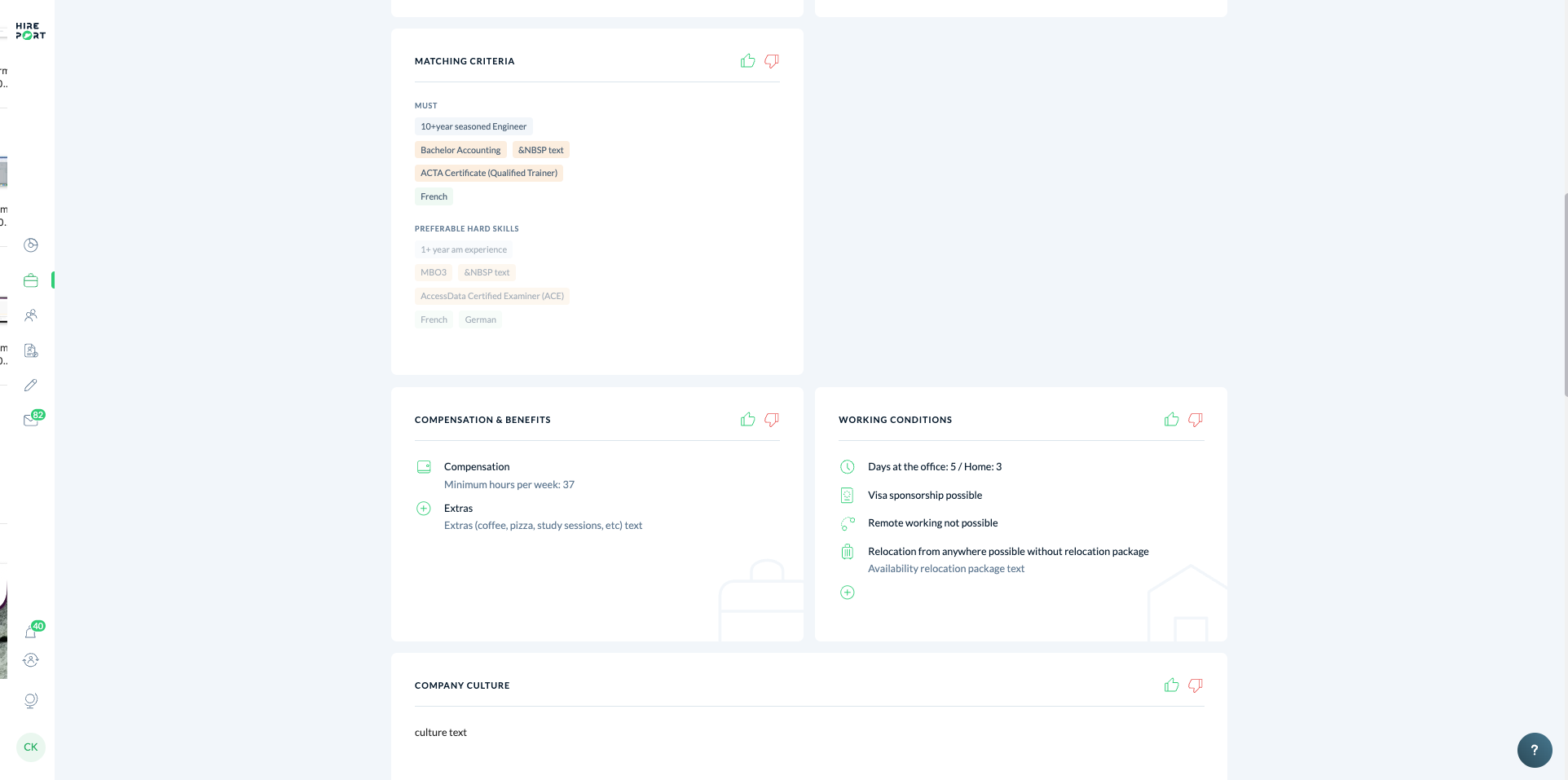
Matching criteria
Compensation & benefits
Working conditions
Company culture
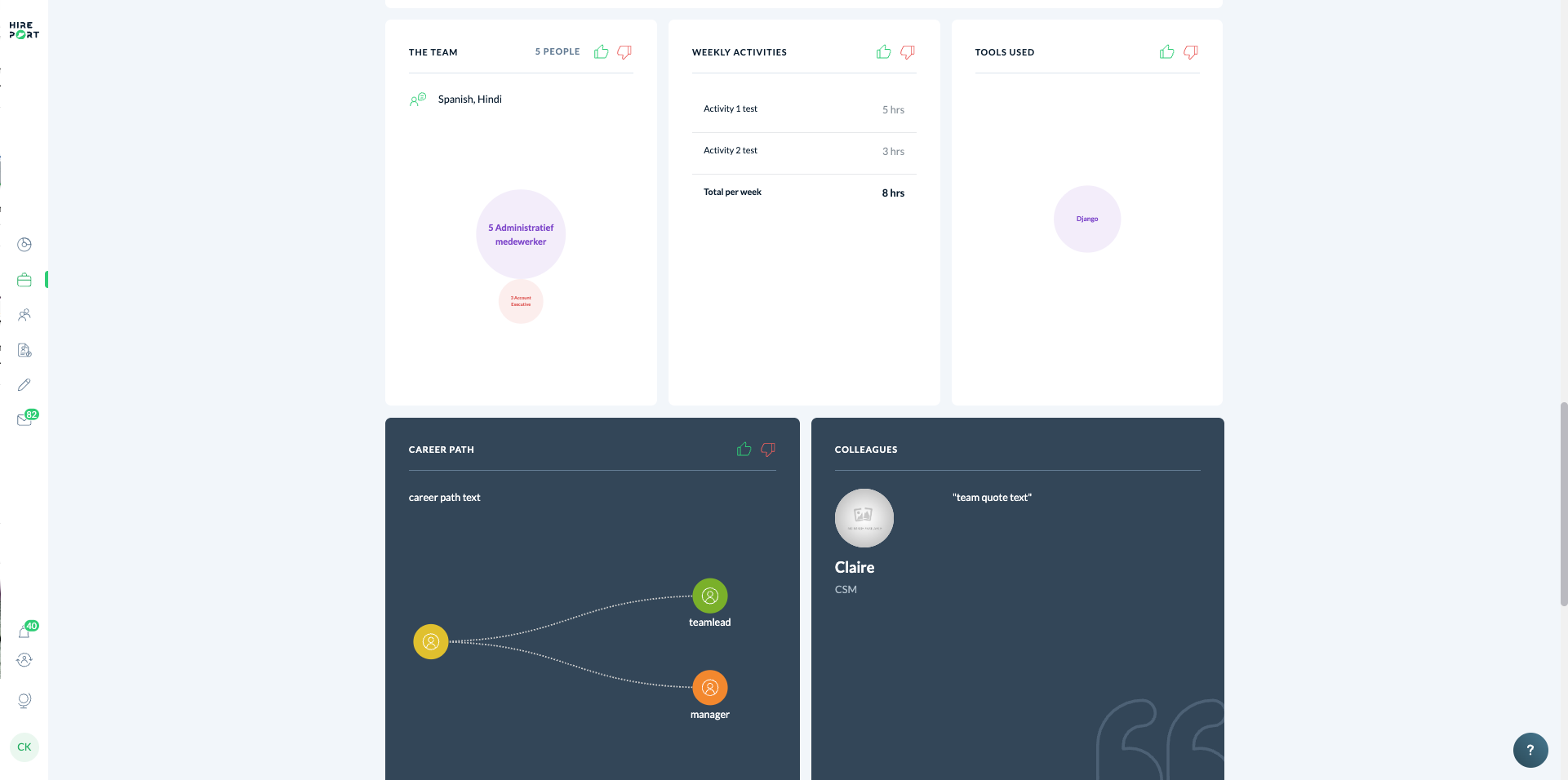
The team
Weekly activities & tools used
Career path
Colleagues
Job summary
At the top of each vacancy, you'll find a quick overview of the most important details:
Job title and employer – displayed prominently at the top of the page
Short job description – a two-sentence summary of the role
Employment type – e.g. Permanent Employment
Location – the city where the role is based
Job code – a unique reference code for the vacancy (e.g. Ybs46)
Pay frequency – e.g. Monthly
Company size – the number of employees at the hiring organisation
Must-have skills – key requirements shown as tags (e.g. "10+ year seasoned Engineer")
Required certifications – e.g. ACTA Certificate (Qualified Trainer)
Language requirements – e.g. French
Office requirement – e.g. Full office/project location
Visa sponsorship – whether visa sponsorship is available
From the job summary, you can also:
Click I have a question to contact the client directly via the job chat (this button opens a job-specific chat with your client)
Click Appoint a candidate to submit a candidate to this vacancy
About the company
This section gives you background on the hiring organisation to help you position the role with candidates. It is optional and may not appear on every vacancy.
Click See more to expand the full company description.
Competitive USPs / Summary – a short overview of what makes this employer stand out from competitors, helping you pitch the role more convincingly to candidates.
Job description
This section describes the role in detail, including what the candidate will be doing and what problem they will be solving for the business. It is optional and may not appear on every vacancy.
Click See more to expand the full job description.
Projects the team is working on – a description of the current projects the candidate would be contributing to, giving candidates a concrete picture of the work involved.
Ideal candidate – a profile of the type of person the client is looking for, describing the background, mindset, or experience that would make someone a strong fit.
What problem the candidate will solve – an explanation of the business challenge or gap this hire is meant to address, giving candidates context for why the role exists.
Matching criteria
This section defines exactly who qualifies for the role. Use it to screen candidates before submitting.
It is divided into two parts:
Must – non-negotiable requirements. Candidates who do not meet these will not be considered. Examples include:
Years of experience (e.g. 10+ year seasoned Engineer)
Education (e.g. Bachelor Accounting)
Certifications (e.g. ACTA Certificate – Qualified Trainer)
Languages (e.g. French)
Preferable skills – nice-to-have qualifications that strengthen a candidate's profile. Examples include:
Additional experience (e.g. 1+ year in a specific area)
Certifications (e.g. AccessData Certified Examiner – ACE)
Additional languages (e.g. French, German)
Tip: Focus first on the Must criteria. Candidates who tick the Preferable hard skills as well will stand out.
Compensation & benefits
This section provides a breakdown of what the client is offering. It is optional and may not appear on every vacancy.
Compensation – includes details such as minimum hours per week (e.g. 37 hours)
Extras – additional perks offered by the employer (e.g. coffee, pizza, study sessions)
Working conditions
This section covers the practical day-to-day setup of the role. It is optional and may not appear on every vacancy.
Details shown may include:
Days at the office / home – e.g. Office: 5 days / Home: 3 days
Visa sponsorship – whether the client can sponsor a work visa
Remote working – whether remote working is possible
Relocation – whether candidates can relocate from anywhere, and whether a relocation package is available
Company culture
This section gives a written description of the company's values, working style, and team dynamics. It is optional and may not appear on every vacancy.
The team
This section shows the composition of the team the candidate would be joining, including the number of people and their roles. It is optional and may not appear on every vacancy.
Weekly activities & tools used
These optional sections give candidates a clearer picture of the day-to-day reality of the role:
Weekly activities – a list of recurring tasks or activities with an estimated time commitment per week (e.g. Activity 1: 5 hrs, Activity 2: 3 hrs — Total: 8 hrs per week)
Tools used – the software or technologies the candidate will work with (e.g. Django)
Career path
This section visualises the possible growth trajectory from the role, showing potential next steps such as Team Lead or Manager. It is optional and may not appear on every vacancy.
Colleagues
This section features a quote and profile from a current team member, giving candidates a personal impression of the team they'd be joining. It is optional and may not appear on every vacancy.
Need Help?
Check our knowledge base for detailed guides and tips
For support, click the ? in the bottom right corner of HirePort to start a chat
Not logged in? Email your question to support@hireport.io
For job-specific questions, reach out to your customer through the chat functionality
Remember: Your success is our success. We're here to help you make the most of HirePort!