Agency removal guide
Last updated: June 17, 2026
Learn how to properly handle agency deactivation in the Advanced Agency Portal This process ensures proper documentation and maintains data integrity while ending agency relationships when necessary.
⚠ Note: It is not possible to remove an agency from a job or from the system if you have candidates in process from this agency.
Reasons for removal
Removal process
Remove job access
Remove the agency from the Advanced Agency Portal
Data retention
Communication
Best practices
Help & support
Reasons for removal
Common causes
Contract violations
Poor performance
Compliance issues
Inactivity
Business closure
Unethical practices
Removal process
Remove job access
Go to "Jobs" and select the jobs that the agency is connected to
Click on "Add External Agency"
Deselect supplier in the list
Confirm choices
Remove the agency from the Advanced Agency Portal
Go to Settings in Smartrecruiters
Select Agency Management
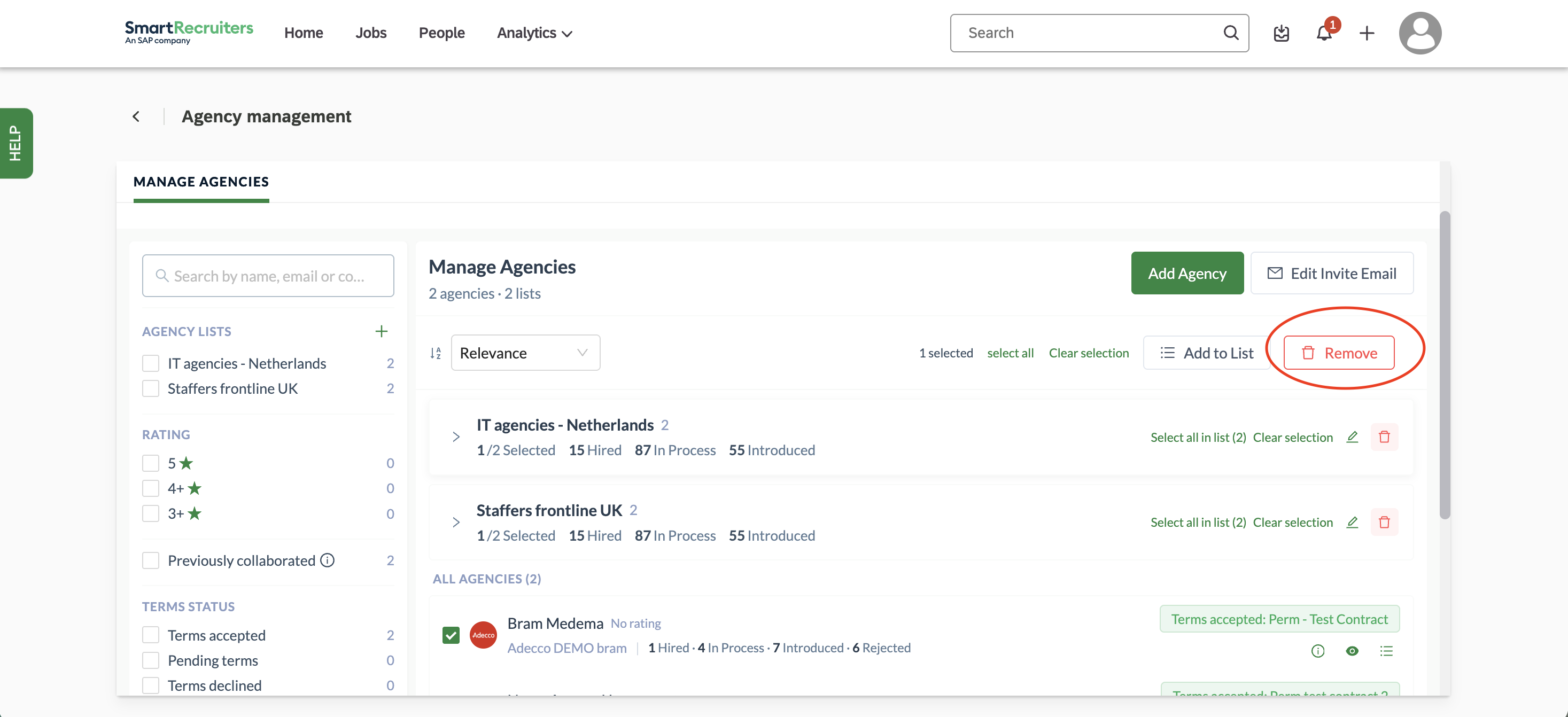
Select the agency you would like to remove from the Advanced Agency Portal
Select "Remove" and confirm in the pop up
You'll see 'successfully removed agency' popping up in your screen.
Data retention
The system will keep
Historical records:
Placement history
Payment records
Performance data
Communication logs
Compliance documents:
Contracts
Certifications
Legal correspondence
Need help?
Contact SmartRecruiters support.