How to create a (Master) Contract
Last updated: June 18, 2026
Managing recruitment agency contracts efficiently is crucial for maintaining consistent terms and fee structures across your organization. SmartRecruiters' master contract feature helps standardize your agency relationships and streamlines the contract management process.
Why Use Master Contracts?
Standardize agency fee structures
Maintain consistent payment terms
Streamline agency onboarding
Enforce compliance across all agency relationships
Reduce administrative overhead
Centralize contract management
Prerequisites
Permission for your role to manage master contracts
Understanding of your organization's fee structures and payment terms
Step-by-Step Process
1. Accessing Master Contracts
Navigate to https://smartrecruiters.com/app/home/
Click on your profile icon in the top-right corner
Select "Settings" from the dropdown menu
Scroll down and click Master Contracts
2. Creating a New Contract
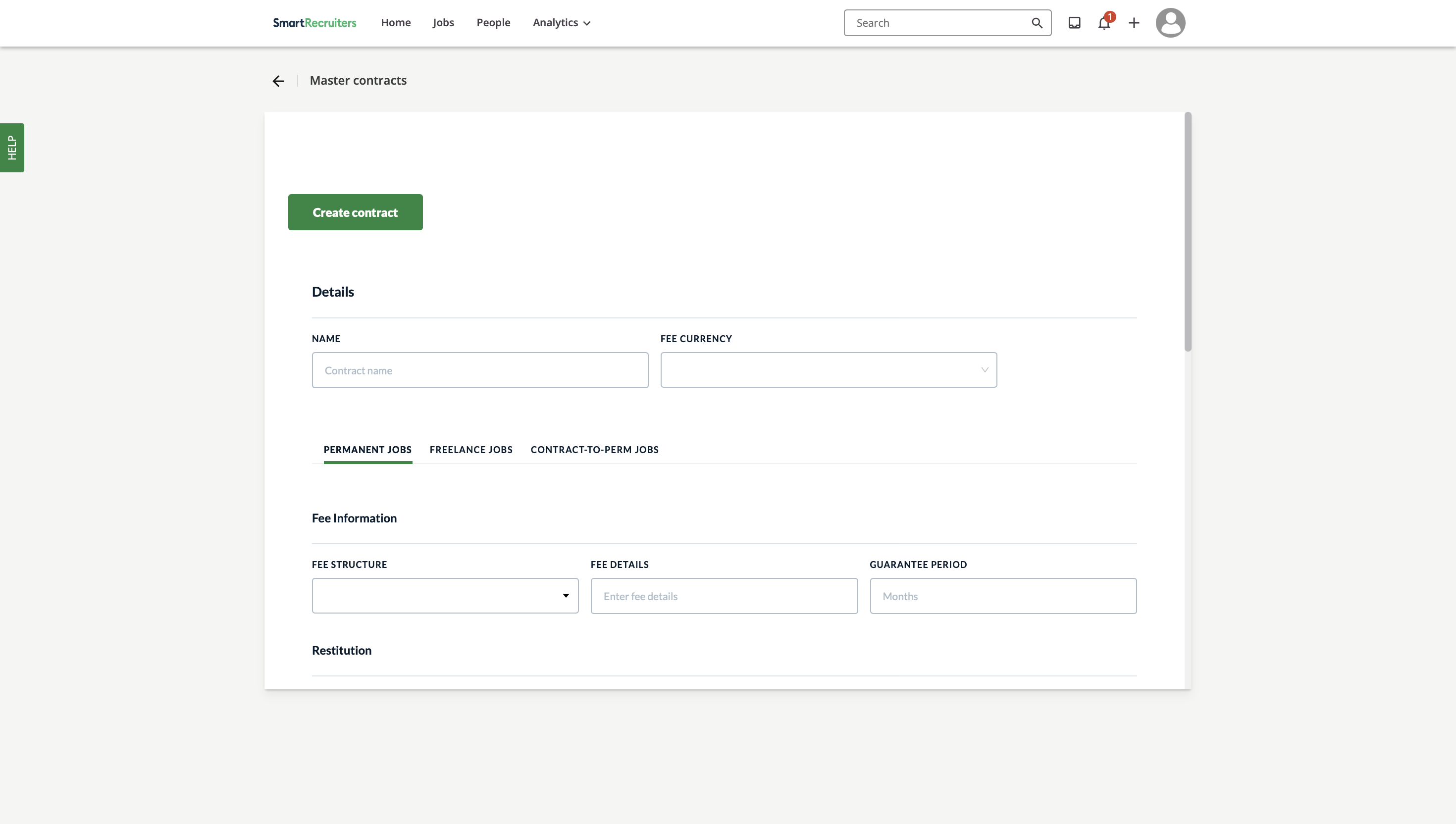
Click the "Create contract" button
Enter the contract details:
Contract name (make it descriptive and clear)
Select fee currency
Choose contract type (Permanent/Freelance/Secondment jobs)
3. Configuring Fee Information
Set up the fee structure:
Choose structure type (Percentage/Fixed/Custom)
Enter fee details
Specify payment terms (in days)
Define payment timing options
Note: Fee structure affects what gets calculated in the system
The contract type you select determines how the system processes fee information in Fee approvals and Agency Analytics.
For permanent placements, a full fee calculation is made based on the fee structure defined in the contract (fixed fee or percentage-based). For freelance and temporary placements, no automatic calculation is made, but the system reads up to 50 characters from the first fee details field and displays that text as-is in the Fee approvals screen. This information is not used in Agency Analytics.
Using salary-based fee brackets in your contract
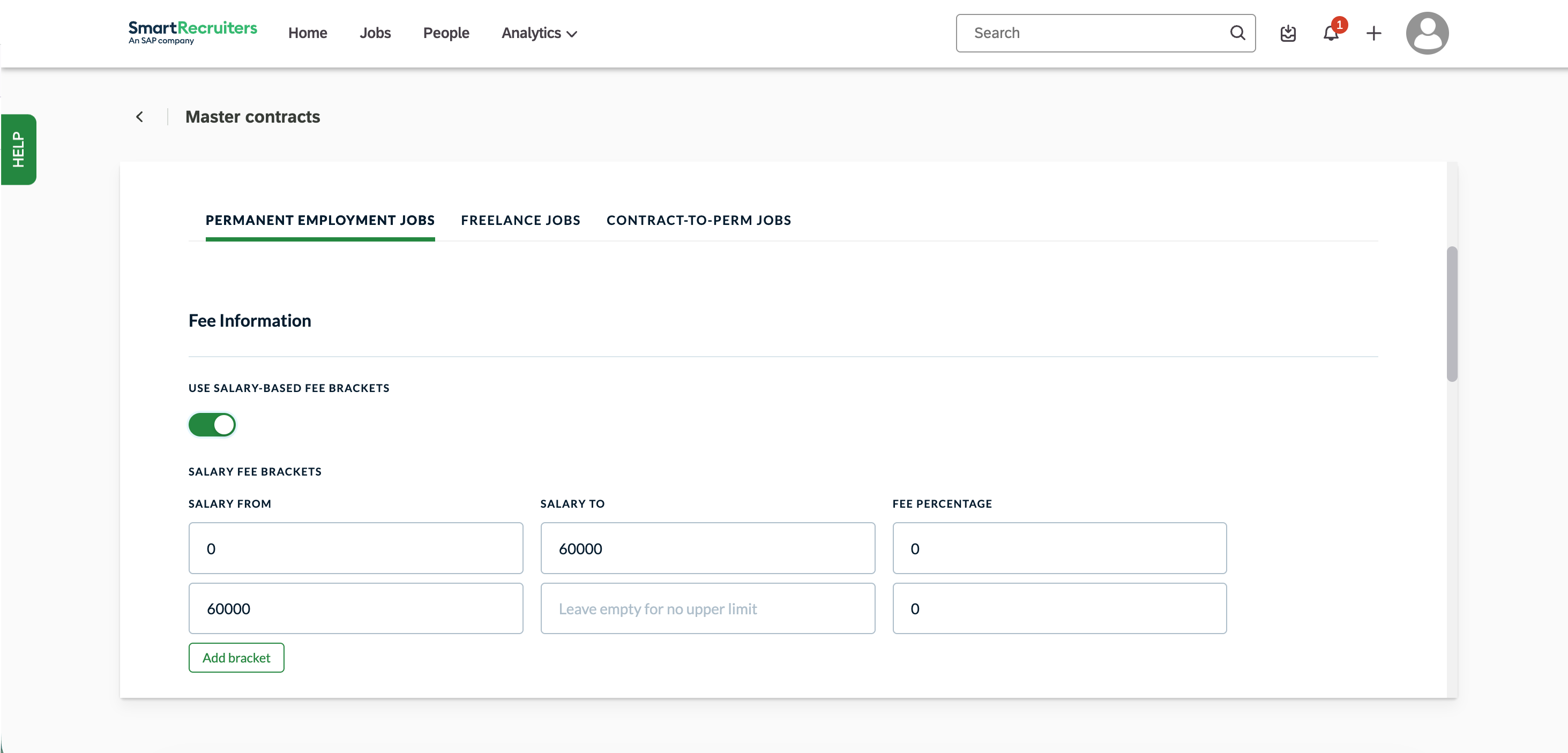
In the Master Contracts screen, you can define salary-based fee brackets to automatically apply different fee percentages depending on a candidate's salary. Enable the toggle next to Use Salary-Based Fee Brackets, then fill in the salary ranges and corresponding fee percentages.
Each bracket requires a Salary From value; the Salary To field can be left empty if the bracket should cover all salaries above a certain threshold. Use Add bracket to define multiple tiers. For example, a lower fee percentage for roles below €60,000 and a higher one above. These brackets are only available for permanent employment vacancies.
4. Setting Up Payment & Restitution Terms
Configure payment terms
Establish exclusivity terms if applicable
5. Finalizing the Contract
Upload the previously signed document
Click "Save" to store the contract
Best Practices
Naming Conventions
Use clear, descriptive names
Include region or contract type if applicable
Add version numbers if needed
Contract Management
Review contracts periodically
Update terms as needed
Document changes and reasons
Maintain version control
Troubleshooting Common Issues
Invalid currency selection
Fee structure conflicts
Payment term inconsistencies
Agency assignment errors
Security Considerations
Verify all contract terms before saving
Double-check agency assignments
Document all changes
Maintain audit trail
Need Help?
Contact SmartRecruiters support